

UNION DUES:
Every member in the Local pays dues, an amount of money collected to assist in meeting the needs of the Local and the National Union. Although you may only see one deduction for union dues on your pay stub, the funds you provide go towards your Local and to the National. As outlined in our Constitution, national union dues will be 0.735% of gross wages, not including overtime.
Union dues are mandatory (no opting out option).
COLLECTIVE AGREEMENT:


PROBATION END DATE CALCULATOR:
Visit www.timeanddate.com and follow the example below to get an estimate probation end date.


WAGE PROGRESSION SCALE:
All new employees will automatically get a raise on Feb 28 each year and another wage increase on their Company Service Date (Date of Joining).

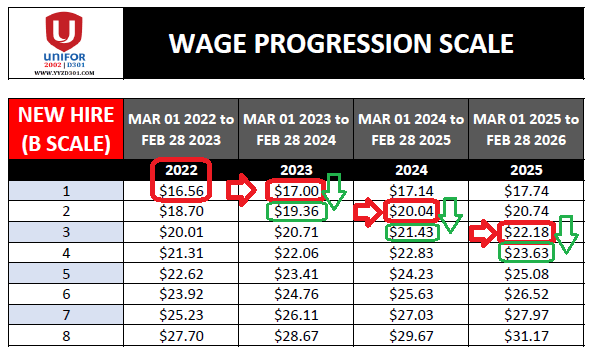
RED ARROW: Feb 28 Yearly Wage Increase
GREEN ARROW: Company Service Date wage increase
NOTE:
- Every year on FEB 28, all employees will receive a pay increase.
- Pay increase can not be on a split pay period. An example of a split pay period: 1st week on the old wage and 2nd week on the new wage. In this circumstance the following pay period will reflect the pay increase.
- New hire starting wage falls under the B Scale Line 1 of the year they were hired on.
- New employees must work 52 weeks until they can receive their 1st Company Service Pay Increase.
- Revised company service due to layoff and certain absence more than 30 days will impact on your pay progression.
VACATION:
Please review Article 14.02 Entitlement in our Collective Agreement for the full detail.
New hire 1st year vacation entitlement calculation is highlighted in red box below.

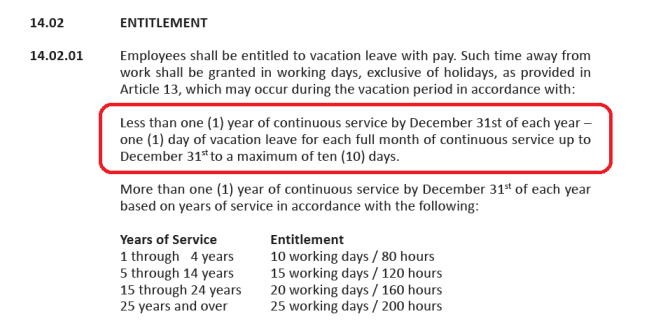
Current year vacation reconciliation will occur at the beginning of the following year.
TRANSFER or RECIPROCAL:
ARTICLE 12 – TRANSFER


New hires must serve a 12 months residency before they are allowed to transfer to another location or base (Location = Airport, CJM, Reservation | BASE = YUL, YVR, YYZ etc…).
Exception: Employees are allow to request to change to a different status (Part-time or Full-time) within the current location (example; Toronto Airport PT request to Toronto Airport FT and vice versa).
HR Connex > e-Transfer > Create > Fill in Requested Position


SHIFT TRADE:
- Learn how to use the ESS tool, please download and review the ESS Employee User Guide.
- More information on shift trades go to Work > Shift Trade
UNIFOR SHAREPOINT:
SharePoint will be use for Shift Bidding and quick link to company forms (6.15 & Vacation waitlist).
UNIFOR SHAREPOINT – https://aircanada.sharepoint.com/sites/UniforDistrict301
Please review the document below for instruction on how to add Unifor SharePoint as a shortcut to your ACaeronet.
MEDICAL & DENTAL BENEFITS (CLAIMSECURE)
Aeronet > HR Connex > Health and Dental Claims


CLAIMSECURE APP:


SIGNING INTO APP:


Passcode: Aeronet’s passcode
QUICK LINKS:
UNIFOR NEW MEMBER KITS: